起因:子组件VueMarkdownIt渲染的表格,格式无法在style scoped里面配置
https://cn.vuejs.org/api/sfc-css-features
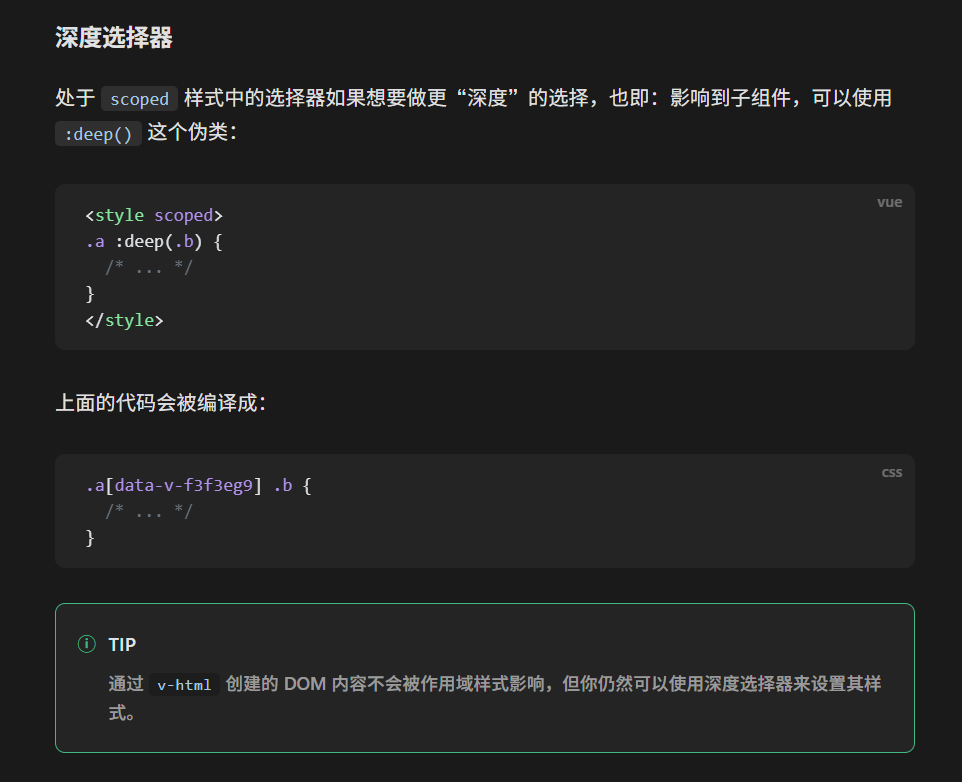
v-html动态生成内容以及子组件应当使用deep选择器

起因:子组件VueMarkdownIt渲染的表格,格式无法在style scoped里面配置
https://cn.vuejs.org/api/sfc-css-features
v-html动态生成内容以及子组件应当使用deep选择器
鉴于初始化了这么多次,每次都忘记,遂记录
pnpm create vue@latest略
https://tailwindcss.com/docs/installation/using-vite
第6步改为在main.ts中import
import './assets/main.css'; //替换为第三步import了TailwindCSS的文件注意:主题设置(最新范式)
Tailwind CSS 的最新版本(v4.0)在主题设置上发生了重大的范式转移。与以往在 tailwind.config.js 中编写 JavaScript 对象不同,v4.0 采用了“CSS-first”的配置方式。
现在,你直接在 CSS 文件中通过 CSS 变量 来定义和扩展主题。
在 v4.0 中,你不再需要频繁切换到配置文件,而是直接在你的主入口 CSS 文件中使用 @theme 指令。
@import "tailwindcss";

@theme {
  /* 定义新的颜色 */
  --color-brand: #3b82f6;
  --color-accent: #f59e0b;

  /* 扩展或覆盖字体 */
  --font-sans: "Inter", ui-sans-serif, system-ui;

  /* 定义间距 */
  --spacing-128: 32rem;
}当你定义 --color-* 变量时,Tailwind 会自动生成对应的类名(如 text-brand 或 bg-brand)。
--color-blue-500),它会覆盖默认值。--color-mint),它会作为扩展添加。@theme {
--spacing-header: 5rem;
--radius-xl: 1.5rem;
}这会自动生成 h-header 或 rounded-xl 等工具类。
你可以轻松自定义断点:
@theme {
  --breakpoint-3xl: 1920px;
}var(--color-brand) 使用。tailwind.config.js 吗?虽然 v4 倾向于 CSS 配置,但如果你需要复杂的动态逻辑,或者正在从 v3 迁移,你仍然可以通过指令保留旧配置:
@plugin "./my-legacy-config.js";注意: 确保你的 Vite 插件已经更新到最新版本,以支持
@import "tailwindcss";这种新的导入语法。
https://docs.fontawesome.com/web/use-with/vue
注意:AddIcon步骤也必须做(即使只使用免费图标)
// in main.ts or main.js
import './assets/main.css'

import { createApp } from 'vue'
import { createPinia } from 'pinia'

import App from './App.vue'
import router from './router'

/* import the fontawesome core */
import { library } from '@fortawesome/fontawesome-svg-core'

/* import font awesome icon component */
import { FontAwesomeIcon } from '@fortawesome/vue-fontawesome'

const app = createApp(App)

app.component('font-awesome-icon', FontAwesomeIcon)
app.use(createPinia())
app.use(router)

app.mount('#app')If you’re just using the Free icons, the easiest way to get the icons into your app is to add the Free SVG Icon Packages. Here’s an example of how to do that:
/* add fontawesome core */
import { library } from '@fortawesome/fontawesome-svg-core'/* import all the icons in Free Solid, Free Regular, and Brands styles */
import { fas } from '@fortawesome/free-solid-svg-icons'
import { far } from '@fortawesome/free-regular-svg-icons'
import { fab } from '@fortawesome/free-brands-svg-icons'

library.add(fas, far, fab)
使用:
<FontAwesomeIcon icon="fa-solid fa-caret-down" class="ml-1" />后续:FontAwesome全部打包,导致包大小很大,建议换Iconify
基于mozilla Javascript教程的学习笔记
使其在整个页面加载完成后加载的方法:
1.对于外部脚本:添加属性type=”module”/添加defer布尔属性(async:同步,不等待页面加载完成)
2.对于内部脚本:wrap the code in a DOMContentLoaded event listener.
1.推荐使用let(后来者,更完善)
2.区别
(1)无论在哪个位置定义,var定义都会提前到代码段的最前方
(2)var允许重复定义且不会报错,若第一次定义有初值,第二次没有,变量的值不会被覆盖
const 注:对于Object,其元素值是可以修改的
Note that although a constant in JavaScript must always name the same value, you can change the content of the value that it names. This isn’t a useful distinction for simple types like numbers or booleans, but consider an object:
eg
const bird = { species: "Kestrel" };
console.log(bird.species); // "Kestrel"
bird.species = "Striated Caracara";
console.log(bird.species); // "Striated Caracara"
Number(代表所有数,没有float与int之分,但还有Bigint) String Boolean Array Object
指数(Exponent)运算,eg.5**2值为25
推荐使用前者,区别:前者会检查数据类型,后者只检查值
eg:1==’1’true 1===’1’false
使用反引号(`)定义,特性:
1.可以跨多行
2.可以嵌入表达式
eg.
`string text`

`string text line 1
 string text line 2`

`string text ${expression} string text`

tagFunction`string text ${expression} string text`
3.Tag function:Tagged templates
字符串在Javascript中为不可变的,如str[0] = ‘a’不会生效,原字符串不会被更改,若要实现相同效果需要将后方的部分取出来和’a’拼接形成一个新的字符串
是否包含子串
eg.
const browserType = "mozilla";

if (browserType.includes("zilla")) {
  console.log("Found zilla!");
} else {
  console.log("No zilla here!");
}
如题,是否以相应子串开始或结束
返回子串开始位置index(没有返回-1)
eg.
const tagline = "MDN - Resources for developers, by developers";
console.log(tagline.indexOf("x")); // -1
const firstOccurrence = tagline.indexOf("developers");
const secondOccurrence = tagline.indexOf("developers", firstOccurrence + 1);

console.log(firstOccurrence); // 20
console.log(secondOccurrence); // 35
第一个参数为开始位置,第二个参数为结束位置,不填写则取到字符串结束,填写负数则表示从后往前数
eg.
const browserType = "mozilla";
console.log(browserType.slice(1, 4)); // "ozi"
返回转小写/大写后的字符串(不会改变原来的字符串)
将字符串中第一个出现的前者替换为后者(不改变原来的字符串)
改变所有
取相应位置的字符
如题,取某个对象的index
添加元素到数组末尾,返回值为新数组长度
添加元素到数组首,返回值为新数组长度
连接数组/元素到末端,返回新数组(不会改变原数组,与push区别)
删除数组尾元素并返回该元素
删除数组首元素并返回该元素
删除第一个参数开始第二个参数个的元素并返回这些元素组成的数组
item改变不会导致原数组相应内容改变
对每个元素执行相同操作后返回新的数组(函数的三个参数:element index array)
筛选出函数返回为真的元素并返回这些元素组成的数组(函数的三个参数:element index array)
将数组展平(解除多层嵌套)
eg.
const arr1 = [0, 1, 2, [3, 4]];

console.log(arr1.flat());
// expected output: Array [0, 1, 2, 3, 4]

const arr2 = [0, 1, [2, [3, [4, 5]]]];

console.log(arr2.flat());
// expected output: Array [0, 1, 2, Array [3, Array [4, 5]]]

console.log(arr2.flat(2));
// expected output: Array [0, 1, 2, 3, Array [4, 5]]

console.log(arr2.flat(Infinity));
// expected output: Array [0, 1, 2, 3, 4, 5]
把所有元素拼接在一起,以参数分隔,成为一个新的字符串(非字符串元素会转换为字符串)
把所有元素拼接在一起,以逗号分隔
switch (expression) {
  case choice1:
    // run this code
    break;

  case choice2:
    // run this code instead
    break;

  // include as many cases as you like

  default:
    // actually, just run this code
    break;
}
当用于回调函数时,常常使用箭头函数(某种程度上是匿名函数的替代)
eg.
textBox.addEventListener("keydown", function (event) {
  console.log(`You pressed "${event.key}".`);
});	//匿名函数

textBox.addEventListener("keydown", (event) => {
  console.log(`You pressed "${event.key}".`);
});	//箭头函数

const originals = [1, 2, 3];
const doubled = originals.map(item => item * 2);
console.log(doubled); // [2, 4, 6]
//return也有时可以省略
回调函数的参数为event
移除回调函数为第二个参数的第一参数类型的eventlistener
const controller = new AbortController();

btn.addEventListener("click",
  () => {
    const rndCol = `rgb(${random(255)} ${random(255)} ${random(255)})`;
    document.body.style.backgroundColor = rndCol;
  },
  { signal: controller.signal } // pass an AbortSignal to this handler
);

controller.abort(); // removes any/all event handlers associated with this controller
指向event触发主体(直接触发主体)
指向当前冒泡冒到的主体(handler所绑定的主体)
阻止默认行为(submit使用居多)
停止事件传播
event默认行为:冒泡(bubbling),从内层元素到外层元素触发
capture:反方向,从外到内触发
pass the capture option in addEventListener()
eg.
const output = document.querySelector("#output");
function handleClick(e) {
  output.textContent += `You clicked on a ${e.currentTarget.tagName} element\n`;
}

const container = document.querySelector("#container");
const button = document.querySelector("button");

document.body.addEventListener("click", handleClick, { capture: true });
container.addEventListener("click", handleClick, { capture: true });
button.addEventListener("click", handleClick);
像是class与dict的糅合体
通过写出objectd的内容创建对象(成员可以是函数)
const person = {
  name: ["Bob", "Smith"],
  age: 32,
  bio() {
    console.log(`${this.name[0]} ${this.name[1]} is ${this.age} years old.`);
  },
  introduceSelf() {
    console.log(`Hi! I'm ${this.name[0]}.`);
  },
};
1.通过点访问
name.first;
name.last;
2.通过中括号访问
person.age;
person.name.first;
像创建函数一样创建类
eg
function Person(name) {
  this.name = name;
  this.introduceSelf = function () {
    console.log(`Hi! I'm ${this.name}.`);
  };
}

const salva = new Person("Salva");
salva.introduceSelf();
// "Hi! I'm Salva."

const frankie = new Person("Frankie");
frankie.introduceSelf();
// "Hi! I'm Frankie."
类似继承与多态,prototype即相当于object的父类
object默认的prototype为Object.prototype,也是最基本的prototype
当获取Object的成员时,会沿着prototype一路向上搜索,称为prototype chain,直到搜索到第一个满足条件的成员(类似多态)或者prototype为null为止
返回object的prototype
法1. object Object.create(object),参数为prototype
法2.设置constructor的prototype,之后该constructor创建的所有object都会具有相应的prototype
eg.
const personPrototype = {
  greet() {
    console.log(`hello, my name is ${this.name}!`);
  },
};

function Person(name) {
  this.name = name;
}

Object.assign(Person.prototype, personPrototype);
// or
// Person.prototype.greet = personPrototype.greet;
指直接由本层构造器定义的property
判断是否为own property:
eg.
const irma = new Person("Irma");

console.log(Object.hasOwn(irma, "name")); // true
console.log(Object.hasOwn(irma, "greet")); // false
实际上同时实例化的多个对象,通过prototype连接在一起,与其说是继承不如说是“代理/委托”(delegation)
eg.
class Student extends Person {
  #year;

  constructor(name, year) {
    super(name);
    this.#year = year;
  }

  introduceSelf() {
    console.log(`Hi! I'm ${this.name}, and I'm in year ${this.#year}.`);
  }

  canStudyArchery() {
    return this.#year > 1;
  }
}
底层仍然使用object实现(仍然是prototype的方式实现继承),但多了把函数/对象变成私有的方法:在前面加#

WIndow代表加载页面的浏览器窗口,The window is the browser tab that a web page is loaded into;this is represented in JavaScript by the Window object. Using methods available on this object you can do things like return the window’s size (see Window.innerWidth and Window.innerHeight), manipulate the document loaded into that window, store data specific to that document on the client-side (for example using a local database or other storage mechanism), attach an event handler to the current window, and more.
Navigator代表浏览器The navigator represents the state and identity of the browser (i.e. the user-agent) as it exists on the web. In JavaScript, this is represented by the Navigator object. You can use this object to retrieve things like the user’s preferred language, a media stream from the user’s webcam, etc.
Document则为实际加载的页面The document (represented by the DOM in browsers) is the actual page loaded into the window, and is represented in JavaScript by the Document object. You can use this object to return and manipulate information on the HTML and CSS that comprises the document, for example get a reference to an element in the DOM, change its text content, apply new styles to it, create new elements and add them to the current element as children, or even delete it altogether.
参数为tagname,创建相应标签(节点)
在最后添加新的子元素
创建纯文字节点
删除相应的孩子节点
删除自身
也可以使用linkPara.parentNode.removeChild(linkPara)代替
style名称使用小驼峰命名法代替横线
设置属性值
两重实现异步程序的形式:
1.callback
弊端:多层嵌套,难以处理错误,需要在每一层处理错误,难以理解
eg.
function doStep1(init, callback) {
  const result = init + 1;
  callback(result);
}

function doStep2(init, callback) {
  const result = init + 2;
  callback(result);
}

function doStep3(init, callback) {
  const result = init + 3;
  callback(result);
}

function doOperation() {
  doStep1(0, (result1) => {
    doStep2(result1, (result2) => {
      doStep3(result2, (result3) => {
        console.log(`result: ${result3}`);
      });
    });
  });
}

doOperation();
2.promise
对于Promise对象:
const fetchPromise = fetch( "https://mdn.github.io/learning-area/javascript/apis/fetching-data/can-store/products.json", ); fetchPromise .then((response) => response.json()) .then((data) => { console.log(data[0].name); });const fetchPromise = fetch( "bad-scheme://mdn.github.io/learning-area/javascript/apis/fetching-data/can-store/products.json", ); fetchPromise .then((response) => { if (!response.ok) { throw new Error(`HTTP error: ${response.status}`); } return response.json(); }) .then((data) => { console.log(data[0].name); }) .catch((error) => { console.error(`Could not get products: ${error}`); });构建一个async异步函数,在内部try catch,并await执行promise,此时promise被await修饰后直接返回fulfill时的值(被resolve),并与该函数同步执行,可直接顺序写下一步
eg.
async function fetchProducts() {
  try {
    // after this line, our function will wait for the `fetch()` call to be settled
    // the `fetch()` call will either return a Response or throw an error
    const response = await fetch(
      "https://mdn.github.io/learning-area/javascript/apis/fetching-data/can-store/products.json",
    );
    if (!response.ok) {
      throw new Error(`HTTP error: ${response.status}`);
    }
    // after this line, our function will wait for the `response.json()` call to be settled
    // the `response.json()` call will either return the parsed JSON object or throw an error
    const data = await response.json();
    console.log(data[0].name);
  } catch (error) {
    console.error(`Could not get products: ${error}`);
  }
}

fetchProducts();
注意,async修饰的函数返回Promise对象,其fulfilled后的值(then里调用回调函数处理的)为函数的返回值,rejected则为throw error的情况
eg.
const fetchPromise1 = fetch(
  "https://mdn.github.io/learning-area/javascript/apis/fetching-data/can-store/products.json",
);
const fetchPromise2 = fetch(
  "https://mdn.github.io/learning-area/javascript/apis/fetching-data/can-store/not-found",
);
const fetchPromise3 = fetch(
  "https://mdn.github.io/learning-area/javascript/oojs/json/superheroes.json",
);

Promise.all([fetchPromise1, fetchPromise2, fetchPromise3])
  .then((responses) => {
    for (const response of responses) {
      console.log(`${response.url}: ${response.status}`);
    }
  })
  .catch((error) => {
    console.error(`Failed to fetch: ${error}`);
  });
eg.
const fetchPromise1 = fetch(
  "https://mdn.github.io/learning-area/javascript/apis/fetching-data/can-store/products.json",
);
const fetchPromise2 = fetch(
  "https://mdn.github.io/learning-area/javascript/apis/fetching-data/can-store/not-found",
);
const fetchPromise3 = fetch(
  "https://mdn.github.io/learning-area/javascript/oojs/json/superheroes.json",
);

Promise.any([fetchPromise1, fetchPromise2, fetchPromise3])
  .then((response) => {
    console.log(`${response.url}: ${response.status}`);
  })
  .catch((error) => {
    console.error(`Failed to fetch: ${error}`);
  });
promise Promise(function(resolve,reject))
作为参数的函数其参数内容为两个函数指针,其内容则为promise需要实现的内容,若成功执行则调用resolve函数(参数为作为then参数的返回值),失败则调用reject(error),抛出错误也视为reject
eg.
function alarm(person, delay) {
  return new Promise((resolve, reject) => {
    if (delay < 0) {
      reject(new Error("Alarm delay must not be negative"));
      return;
    }
    setTimeout(() => {
      resolve(`Wake up, ${person}!`);
    }, delay);
  });
}
为Javascript提供了多线程的可能。
// Create a new worker, giving it the code in "generate.js" const worker = new Worker("./generate.js"); // When the user clicks "Generate primes", send a message to the worker. // The message command is "generate", and the message also contains "quota", // which is the number of primes to generate. document.querySelector("#generate").addEventListener("click", () => { const quota = document.querySelector("#quota").value; worker.postMessage({ command: "generate", quota, }); }); // When the worker sends a message back to the main thread, // update the output box with a message for the user, including the number of // primes that were generated, taken from the message data. worker.addEventListener("message", (message) => { document.querySelector("#output").textContent = `Finished generating ${message.data} primes!`; }); document.querySelector("#reload").addEventListener("click", () => { document.querySelector("#user-input").value = 'Try typing in here immediately after pressing "Generate primes"'; document.location.reload(); });worker.js
// Listen for messages from the main thread.
// If the message command is "generate", call `generatePrimes()`
addEventListener("message", (message) => {
  if (message.data.command === "generate") {
    generatePrimes(message.data.quota);
  }
});

// Generate primes (very inefficiently)
function generatePrimes(quota) {
  function isPrime(n) {
    for (let c = 2; c <= Math.sqrt(n); ++c) {
      if (n % c === 0) {
        return false;
      }
    }
    return true;
  }

  const primes = [];
  const maximum = 1000000;

  while (primes.length < quota) {
    const candidate = Math.floor(Math.random() * (maximum + 1));
    if (isPrime(candidate)) {
      primes.push(candidate);
    }
  }

  // When we have finished, send a message to the main thread,
  // including the number of primes we generated.
  postMessage(primes.length);
}
fetch会返回promise,只要网络没有错误,无论HTTP状态码,均视为fulfilled,故需要判断response.ok
response.json() response.text()等均返回Promise,需要继续then处理
eg.
// Call `fetch()`, passing in the URL.
fetch(url)
  // fetch() returns a promise. When we have received a response from the server,
  // the promise's `then()` handler is called with the response.
  .then((response) => {
    // Our handler throws an error if the request did not succeed.
    if (!response.ok) {
      throw new Error(`HTTP error: ${response.status}`);
    }
    // Otherwise (if the response succeeded), our handler fetches the response
    // as text by calling response.text(), and immediately returns the promise
    // returned by `response.text()`.
    return response.text();
  })
  // When response.text() has succeeded, the `then()` handler is called with
  // the text, and we copy it into the `poemDisplay` box.
  .then((text) => {
    poemDisplay.textContent = text;
  })
  // Catch any errors that might happen, and display a message
  // in the `poemDisplay` box.
  .catch((error) => {
    poemDisplay.textContent = `Could not fetch verse: ${error}`;
  });
constructor可选参数中,包含method、headers等,例子:
const response = await fetch("https://example.org/post", {
  method: "POST",
  headers: {
    "Content-Type": "application/x-www-form-urlencoded",
  },
  // Automatically converted to "username=example&password=password"
  body: new URLSearchParams({ username: "example", password: "password" }),
  // ...
});

const response = await fetch("https://example.org/post", {
  method: "POST",
  body: JSON.stringify({ username: "example" }),
  // ...
});
使用request与克隆请求
eg.
const request1 = new Request("https://example.org/post", {
  method: "POST",
  body: JSON.stringify({ username: "example" }),
});

const request2 = request1.clone();

const response1 = await fetch(request1);
console.log(response1.status);

const response2 = await fetch(request2);
console.log(response2.status);
对于图片类二进制文件,使用该方法,处理时,URL.createObjectURL(blob)会生成该图片的blob url(可以当做普通url使用)
Whether a request can be made cross-origin or not is determined by the value of the RequestInit.mode option. This may take one of three values: cors, same-origin, or no-cors.
const request = new XMLHttpRequest();

try {
  request.open("GET", "products.json");

  request.responseType = "json";

  request.addEventListener("load", () => initialize(request.response));
  request.addEventListener("error", () => console.error("XHR error"));

  request.send();
} catch (error) {
  console.error(`XHR error ${request.status}`);
}
There are five stages to this:
We also have to wrap the whole thing in the try…catch block, to handle any errors thrown by open() or send().
Hopefully you think the Fetch API is an improvement over this. In particular, see how we have to handle errors in two different places.
类似于类中封装私有变量,外部不可访问,只能通过函数访问
定义:闭包是指 函数能够“捕获”并记住其定义时所在的作用域,即使在该作用域外调用函数,仍能访问该作用域中的变量。
例子:
const counter = (function () {
  let privateCounter = 0;
  function changeBy(val) {
    privateCounter += val;
  }

  return {
    increment() {
      changeBy(1);
    },

    decrement() {
      changeBy(-1);
    },

    value() {
      return privateCounter;
    },
  };
})();

console.log(counter.value()); // 0.

counter.increment();
counter.increment();
console.log(counter.value()); // 2.

counter.decrement();
console.log(counter.value()); // 1.
可以嵌套
eg.
// global scope
const e = 10;
function sum(a) {
  return function (b) {
    return function (c) {
      // outer functions scope
      return function (d) {
        // local scope
        return a + b + c + d + e;
      };
    };
  };
}

console.log(sum(1)(2)(3)(4)); // 20
// global scope
const e = 10;
function sum(a) {
  return function sum2(b) {
    return function sum3(c) {
      // outer functions scope
      return function sum4(d) {
        // local scope
        return a + b + c + d + e;
      };
    };
  };
}

const sum2 = sum(1);
const sum3 = sum2(2);
const sum4 = sum3(3);
const result = sum4(4);
console.log(result); // 20
常见错误:var定义变量不会对大括号作用域生效,故所有item共享一个作用域,后面内容被覆盖
function showHelp(help) {
  document.getElementById("help").textContent = help;
}

function setupHelp() {
  var helpText = [
    { id: "email", help: "Your email address" },
    { id: "name", help: "Your full name" },
    { id: "age", help: "Your age (you must be over 16)" },
  ];

  for (var i = 0; i < helpText.length; i++) {
    // Culprit is the use of `var` on this line
    var item = helpText[i];
    document.getElementById(item.id).onfocus = function () {
      showHelp(item.help);
    };
  }
}

setupHelp();
解决方法1:每个函数创建新的闭包,变量被复制到新闭包作用域中使用
function showHelp(help) {
  document.getElementById("help").textContent = help;
}

function makeHelpCallback(help) {
  return function () {
    showHelp(help);
  };
}

function setupHelp() {
  var helpText = [
    { id: "email", help: "Your email address" },
    { id: "name", help: "Your full name" },
    { id: "age", help: "Your age (you must be over 16)" },
  ];

  for (var i = 0; i < helpText.length; i++) {
    var item = helpText[i];
    document.getElementById(item.id).onfocus = makeHelpCallback(item.help);
  }
}

setupHelp();
解决方法2.使用let定义变量(对大括号生效)
function showHelp(help) {
  document.getElementById("help").textContent = help;
}

function setupHelp() {
  const helpText = [
    { id: "email", help: "Your email address" },
    { id: "name", help: "Your full name" },
    { id: "age", help: "Your age (you must be over 16)" },
  ];

  for (let i = 0; i < helpText.length; i++) {
    const item = helpText[i];
    document.getElementById(item.id).onfocus = () => {
      showHelp(item.help);
    };
  }
}

setupHelp();
AI讲得好好…1
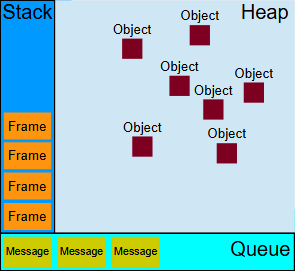
同步代码被立即压入stack中,当stack执行完成时,event loop会从queue中取message,将其回调函数压入stack中,stack执行完毕后重复该过程
在执行message的过程中,微任务会比宏任务先执行
微任务的优先级较高,会在当前的 宏任务执行结束后,立即执行。在事件循环中,如果有微任务待处理,微任务会在进入下一个宏任务之前完成。
常见的微任务包括:
宏任务的优先级低于微任务。事件循环每次循环会取出一个宏任务执行,然后处理所有的微任务,接着再进入下一个宏任务。
常见的宏任务包括:
模块js文件中采用export导出需要被导入的对象(可以在模块末尾集中导出或者在需要导出的函数/对象前添加export关键词)
eg.
function create(id, parent, width, height) {
  ...
}

function createReportList(wrapperId) {
  ...
}

export { create, createReportList };
或者
export const name = "square";

export function draw(ctx, length, x, y, color) {
  ctx.fillStyle = color;
  ctx.fillRect(x, y, length, length);

  return { length, x, y, color };
}
主js文件(直接嵌入html的)通过import导入
eg.
import { name, draw, reportArea, reportPerimeter } from "./modules/square.js";
特性:
一个模块文件只能存在一个
eg.
export default function (ctx) {
  // ...
}
导入:
import { default as randomSquare } from "./modules/square.js";
或者
import randomSquare from "./modules/square.js";
eg.
// module.js 中
export { function1 as newFunctionName, function2 as anotherNewFunctionName };

// main.js 中
import { newFunctionName, anotherNewFunctionName } from "/modules/module.js";
// module.js 中
export { function1, function2 };

// main.js 中
import {
  function1 as newFunctionName,
  function2 as anotherNewFunctionName,
} from "./modules/module.js";
将模块功能导入到一个模块功能对象中
eg.
import * as Module from "/modules/module.js";
使用时
Module.function1();
Module.function2();
eg.
shape.js
export { Square } from "./shapes/square.js";
export { Triangle } from "./shapes/triangle.js";
export { Circle } from "./shapes/circle.js";
main.js
import { Square, Circle, Triangle } from "./modules/shapes.js";
例如,下面导入映射中的 imports 键定义了一个“模块标识符映射”JSON 对象,其中属性名称可以用作模块标识符,当浏览器解析模块 URL 时,相应的值将被替换。这些值必须是绝对或相对 URL。使用文档包含导入映射的基础 URL 将相对 URL 解析为绝对 URL。
<script type="importmap">
  {
    "imports": {
      "shapes": "./shapes/square.js",
      "shapes/square": "./modules/shapes/square.js",
      "https://example.com/shapes/square.js": "./shapes/square.js",
      "https://example.com/shapes/": "/shapes/square/",
      "../shapes/square": "./shapes/square.js"
    }
  }
</script>
然后
// 裸模块名称作为模块标识符
import { name as squareNameOne } from "shapes";
import { name as squareNameTwo } from "shapes/square";

// 重新映射一个 URL 到另一个 URL
import { name as squareNameThree } from "https://example.com/shapes/square.js";
// 重新映射一个 URL 作为前缀 ( https://example.com/shapes/)
import { name as squareNameFour } from "https://example.com/shapes/moduleshapes/square.js";
在导入映射中,可能有多个键可以匹配一个模块标识符。例如,模块标识符 shapes/circle/ 可以匹配模块标识符键 shapes/ 和 shapes/circle/。在这种情况下,浏览器将选择最具体(最长)的匹配模块标识符键。
…
新的数据结构,用于去重
eg.
const uniqueNumbers = new Set([1, 2, 2, 3]);
console.log(uniqueNumbers); // Set {1, 2, 3}
键值对存储(哈希表查找,查找方便,key可以是object或任何类型,不一定是number)
Map vs Object
| 适用场景 | 使用Map | 使用Object |
|---|---|---|
| 键类型不确定(对象、函数、数值等) | ✅ | ❌ 只能用字符串 |
| 频繁增删键值对 | ✅O(1)查找 | ❌O(n)查找 |
| 需要按插入顺序存储 | ✅ | ❌ 顺序不固定 |
| 遍历键值对 | ✅ 直接for…of | ❌ 需Object.entries() |
| 大小管理(.size) | ✅ 直接map.size | ❌ 需Object.keys().length |
| 简单的键值存储(少量数据) | ⛔Map适合大量数据 | ✅Object更轻量 |
| 兼容性(旧版 JS 环境) | ❌ 可能不兼容老浏览器 | ✅ 所有 JS 版本支持 |
| 用途 | 扩展运算符(…) |
|---|---|
| 数组复制 | const copy = […arr] |
| 数组合并 | const merged = […arr1, …arr2] |
| 字符串转换数组 | const chars = […”hello”] |
| 对象复制 | const copy = { …obj } |
| 对象合并 | const merged = { …obj1, …obj2 } |
| 对象更新 | const newObj = { …obj, key: newValue } |
| 删除对象属性 | const { key, …rest } = obj; |
| 函数参数展开 | sum(…arr) |
| 剩余参数 | function fn(…args) {} |
扩展运算符 (…) 是 ES6(ES2015)新增的语法,用于展开数组、对象或函数参数,使代码更加简洁、高效。
扩展运算符可以展开(解构)数组,用于复制、合并、转换数组等操作。
扩展运算符可用于创建数组的 浅拷贝(不会影响原数组)。
const arr1 = [1, 2, 3];
const arr2 = [...arr1]; // 复制数组
arr2.push(4);

console.log(arr1); // [1, 2, 3](原数组未受影响)
console.log(arr2); // [1, 2, 3, 4]
使用扩展运算符可以轻松合并多个数组,避免使用 concat() 方法:
const arr1 = [1, 2, 3];
const arr2 = [4, 5, 6];

const merged = [...arr1, ...arr2];
console.log(merged); // [1, 2, 3, 4, 5, 6]
与 concat() 方法对比:
const merged2 = arr1.concat(arr2);
console.log(merged2); // [1, 2, 3, 4, 5, 6]
但使用 … 更简洁、更直观。
可以将 字符串或 NodeList 等可迭代对象转换为数组:
const str = "hello";
const chars = [...str]; // ['h', 'e', 'l', 'l', 'o']
console.log(chars);
对于 NodeList:
const divs = document.querySelectorAll("div");
const divArray = [...divs]; // 转换为数组,便于使用数组方法
console.log(divArray);
在 对象字面量({}) 中,扩展运算符可以用于复制对象、合并对象或更新对象属性。
扩展运算符可以浅拷贝对象(不会拷贝嵌套对象):
const obj1 = { name: "Alice", age: 25 };
const obj2 = { ...obj1 }; // 复制对象

obj2.age = 30;
console.log(obj1); // { name: "Alice", age: 25 }
console.log(obj2); // { name: "Alice", age: 30 }(不会影响原对象)
扩展运算符可用于合并多个对象:
const obj1 = { name: "Alice" };
const obj2 = { age: 25 };
const merged = { ...obj1, ...obj2 };

console.log(merged); // { name: "Alice", age: 25 }
当两个对象有相同的键时,后面的值会覆盖前面的:
const obj1 = { name: "Alice", age: 20 };
const obj2 = { age: 25, city: "New York" };

const merged = { ...obj1, ...obj2 };
console.log(merged); // { name: "Alice", age: 25, city: "New York" }
合并顺序很重要! 后面的 obj2 覆盖了 obj1 的 age。
扩展运算符可以创建新对象,同时修改或添加属性:
const user = { name: "Alice", age: 25 };
const updatedUser = { ...user, age: 30, city: "New York" };

console.log(updatedUser); // { name: "Alice", age: 30, city: "New York" }
这样不会修改原对象,而是创建了一个新对象。
JavaScript 目前没有 delete 以外的删除对象属性的方法,但可以用扩展运算符和 解构赋值 来实现:
const user = { name: "Alice", age: 25, city: "New York" };
const { age, ...rest } = user;

console.log(rest); // { name: "Alice", city: "New York" }
这样 age 被排除,rest 存放了剩下的属性。
扩展运算符可以用于函数参数,用于传递可变数量的参数。
function sum(x, y, z) {
  return x + y + z;
}

const numbers = [1, 2, 3];
console.log(sum(...numbers)); // 6
比 sum(numbers[0], numbers[1], numbers[2]) 更简洁。
const nums = [10, 20, 5, 8];
console.log(Math.max(...nums)); // 20
console.log(Math.min(...nums)); // 5
与 apply() 方法对比:
console.log(Math.max.apply(null, nums)); // 20
… 方式更直观、易读。
扩展运算符也可以用于函数参数,将多个参数合并成数组:
function collect(...items) {
  console.log(items);
}

collect(1, 2, 3, 4); // [1, 2, 3, 4]
这样可以接收任意数量的参数。
示例:计算多个数的和
function sumAll(...nums) {
  return nums.reduce((sum, num) => sum + num, 0);
}

console.log(sumAll(1, 2, 3, 4, 5)); // 15
const obj1 = { name: "Alice" };
const obj2 = { age: 25 };

const merged = Object.assign({}, obj1, obj2);
console.log(merged); // { name: "Alice", age: 25 }
问题: 语法繁琐,必须传入 {}。
const merged = { ...obj1, ...obj2 };
更简洁、更现代。
console.log('A'); setTimeout(() => { console.log('B'); }, 0); Promise.resolve().then(() => { console.log('C'); }); console.log('D'); 执行顺序解析A D C B 示例 2:多个 setTimeout 和 Promise 交错console.log('1'); setTimeout(() => { console.log('2'); }, 0); Promise.resolve().then(() => { console.log('3'); return Promise.resolve(); }).then(() => { console.log('4'); }); console.log('5'); 执行顺序解析1 5 3 4 2 微任务 vs. 宏任务(重点区别)任务类型例子何时执行宏任务(Macrotask)setTimeout、setInterval、setImmediate(Node.js)、I/O、UI 渲染事件循环的每个循环中,取出一个宏任务执行,执行完后,再检查微任务队列。微任务(Microtask)Promise.then()、queueMicrotask()、MutationObserver每次同步任务结束后,立即执行所有微任务,确保微任务队列清空。示例 3:微任务优先级setTimeout(() => console.log('setTimeout'), 0); Promise.resolve().then(() => console.log('Promise1')); queueMicrotask(() => console.log('Microtask')); console.log('Synchronous'); 执行顺序Synchronous Promise1 Microtask setTimeout 事件循环在 Node.js 中的不同在 Node.js,事件循环有更复杂的六个阶段:同一个坑Python掉了一次JS还掉一次,很有生活了
以下为ChatGPT解答
在 JavaScript 中,函数参数传递遵循“按值传递”(pass by value),但对象和数组等复杂数据类型是按引用访问的(pass by reference-like behavior)。
以下类型是按值传递,即传递的是拷贝,函数内部修改参数不会影响原始变量:
function changeValue(x) {
    x = 99; // 修改的是参数 x 的副本
}

let num = 42;
changeValue(num);
console.log(num); // 42 ✅ 原值未变
解释:
x 在 changeValue() 里是 num 的拷贝,函数内部的修改不会影响原始变量。
以下类型是按“引用”访问(实际上仍是按值传递),即传递的是对象的引用地址,函数内部修改对象的内容会影响原始对象:
function modifyObject(obj) {
    obj.name = "Bob"; // 修改的是 obj 的引用指向的对象
}

let person = { name: "Alice" };
modifyObject(person);
console.log(person.name); // "Bob" ✅ 原对象被修改
解释:
虽然对象是按引用访问的,但如果在函数内部重新赋值,不会影响外部对象:
function reassignObject(obj) {
    obj = { name: "Charlie" }; // 重新指向新对象
}

let person = { name: "Alice" };
reassignObject(person);
console.log(person.name); // "Alice" ❌ 原对象未变
解释:
如果想要让函数重新赋值影响外部对象,必须返回新对象:
function reassignObject(obj) {
    return { name: "Charlie" }; // 返回新对象
}

let person = { name: "Alice" };
person = reassignObject(person);
console.log(person.name); // "Charlie" ✅ 重新赋值生效
数组的行为类似对象,传递的是引用:
function modifyArray(arr) {
    arr[0] = 99; // 修改的是数组内部内容
}

let numbers = [1, 2, 3];
modifyArray(numbers);
console.log(numbers); // [99, 2, 3] ✅ 原数组被修改
但如果重新赋值数组,不影响原数组:
function reassignArray(arr) {
    arr = [99, 100, 101]; // 重新指向新数组
}

let numbers = [1, 2, 3];
reassignArray(numbers);
console.log(numbers); // [1, 2, 3] ❌ 原数组未变
function modifyCopy(arr) {
    let copy = [...arr]; // 创建新数组
    copy[0] = 99;
}

let numbers = [1, 2, 3];
modifyCopy(numbers);
console.log(numbers); // [1, 2, 3] ✅ 原数组未变
function deepCopy(obj) {
    return JSON.parse(JSON.stringify(obj));
}

let original = { a: { b: 1 } };
let copy = deepCopy(original);
copy.a.b = 99;

console.log(original.a.b); // 1 ✅ 原对象未变
| 数据类型 | 传递方式 | 影响原值? | 例子 |
|---|---|---|---|
| number,string,boolean,null,undefined,symbol,bigint | 按值传递 | ❌ 不影响 | function(x) { x = 99; } |
| Object,Array,Function,Map,Set等 | 按引用访问 | ✅ 影响 | function(obj) { obj.name = “Bob”; } |
| 重新赋值对象/数组 | 按值传递(新引用) | ❌ 不影响 | function(obj) { obj = { new: “value” }; } |
| JSON.parse(JSON.stringify(obj)) | 深拷贝 | ❌ 不影响 | function deepCopy(obj) { return JSON.parse(JSON.stringify(obj)); } |
这就是 JavaScript 传参的引用与值的区别! 🚀
狗尾续貂:eg
a = [[6],[7,8]];function s(b){b[0]=6;}s(a[1]);
最终a的值为[[6],[6,8]]
传引用的类型值也不可直接比较!
eg.
let arr1 = [1, 2, 3];
let arr2 = [1, 2, 3];

console.log(arr1 === arr2); // false ❌  (不同的引用)
console.log(arr1 == arr2);  // false ❌  (不同的引用)
正确操作(ChatGPT)
| 方法 | 适用场景 | 代码简洁性 | 性能 | 局限性 |
|---|---|---|---|---|
=== | 仅适用于同一引用的数组 | ✅ 简单 | ✅ 快速 | ❌ 不能比较不同引用但内容相同的数组 |
JSON.stringify() | 简单一维数组 | ✅ 简单 | ❌ 性能较差(字符串转换开销) | ❌ 不能比较复杂对象或 undefined、NaN |
递归 every() | 适用于多维数组 | ❌ 需要额外代码 | ✅ 比 JSON.stringify 快 | ❌ 需要额外实现 |
_.isEqual() (Lodash) | 适用于复杂嵌套结构 | ✅ 简单 | ✅ 高效 | ❌ 需要引入 lodash |
最佳选择:
JSON.stringify()every()lodash:直接用 _.isEqual()诸如list的可变类型,变量赋值时原变量与新变量指向同一对象
在 Python 中,变量保存的不是对象本身,而是对对象的引用。赋值操作(例如 a = b)会复制引用,而不是创建新的对象。这意味着 a 和 b 指向同一块内存中的对象,因此对可变对象的修改会在所有指向该对象的变量中生效。
   a = [1, 2, 3]
   b = a  # b 和 a 指向同一个对象
   b[0] = 99
print(a) # 输出: [99, 2, 3]int(整数)、float(浮点数)、str(字符串)、tuple(元组)等。这些对象一旦创建,其内容就无法改变。每次尝试修改会创建一个新对象,而不会改变原有对象。python x = 10 y = x y = 20 print(x) # 输出: 10,不受 y 修改的影响list(列表)、dict(字典)、set(集合)等。这些对象可以直接修改其内容,不需要创建新对象,因此所有指向该对象的引用都会受到影响。import copy original = [[1, 2], [3, 4]] shallow_copy = copy.copy(original) shallow_copy[0][0] = 99 print(original) # 输出: [[99, 2], [3, 4]]python deep_copy = copy.deepcopy(original) deep_copy[0][0] = 42 print(original) # 输出: [[99, 2], [3, 4]]在 Python 中比较浮点数时,由于浮点数的精度限制,直接使用 == 来判断两个浮点数是否相等通常是不可靠的。可以通过设置比较精度(容许误差)来判断两个浮点数是否在特定范围内相等。常用的方法如下:
math.isclose() 函数Python 3.5 引入了 math.isclose() 函数,用于比较两个浮点数是否接近相等。此函数允许设置相对误差和绝对误差,以控制比较精度。
import math

a = 0.1 + 0.2
b = 0.3

# 使用默认精度(相对误差 1e-09)
print(math.isclose(a, b))  # 输出: True

# 设置更高的精度
print(math.isclose(a, b, rel_tol=1e-10, abs_tol=1e-10))
rel_tol:相对误差容忍度,默认为 1e-09。abs_tol:绝对误差容忍度,默认值为 0.0。适合比较非常小的数时使用。如果需要手动设置精度,也可以通过自定义误差范围进行比较。
def is_close(a, b, tol=1e-9):
    return abs(a - b) < tol

a = 0.1 + 0.2
b = 0.3
print(is_close(a, b))  # 输出: True
decimal 模块对于高精度计算,decimal 模块可以更精确地控制小数位数。将浮点数转换为 Decimal 对象后,可以设定精度进行比较。
from decimal import Decimal, getcontext

# 设置精度
getcontext().prec = 10

a = Decimal('0.1') + Decimal('0.2')
b = Decimal('0.3')
print(a == b)  # 输出: True
numpy.isclose()(适合科学计算)numpy.isclose() 是 NumPy 提供的类似 math.isclose() 的函数,适用于比较数组中的浮点数。
import numpy as np

a = 0.1 + 0.2
b = 0.3
print(np.isclose(a, b)) # 输出: TruePowered by WordPress & Theme by Anders Norén